Train your team with courses they'll actually finish.
A full Learning Management System built into your dashboard — from course creation to certificate issuance, with auto-graded quizzes and real-time progress tracking.
Drag-and-drop course builder with lessons, topics, and eight quiz question types. Drip content keeps learners on pace. Certificates and badges reward completion. Analytics show you who's thriving and who needs a nudge.
Build courses with the drag-and-drop builder, assign them to learners, track completion in real time, and issue certificates — all without leaving your dashboard.
Course Builder
Drag-and-drop editor for assembling courses from lessons, topics, and inline quizzes. Native HTML5 DnD — reorder lessons, move topics across lessons, and drag new topic types from the palette. 2-second debounce autosave with version conflict detection.
SCORM Import
Import SCORM 1.2 and SCORM 2004 packages directly. The parser reads imsmanifest.xml, builds lessons automatically, extracts embedded knowledge checks into quiz topics, and injects your tenant branding into the SCORM header. Full resume support via cmi.location persistence.
Quiz Engine
Eight question types — multiple choice, multi-select, true/false, fill-in-the-blank, matching, ordering, short answer, and essay. Auto-grading for objective types; essays and short answers route to the manual grading queue. Configurable attempt limits, time limits, and shuffle.
Course Player
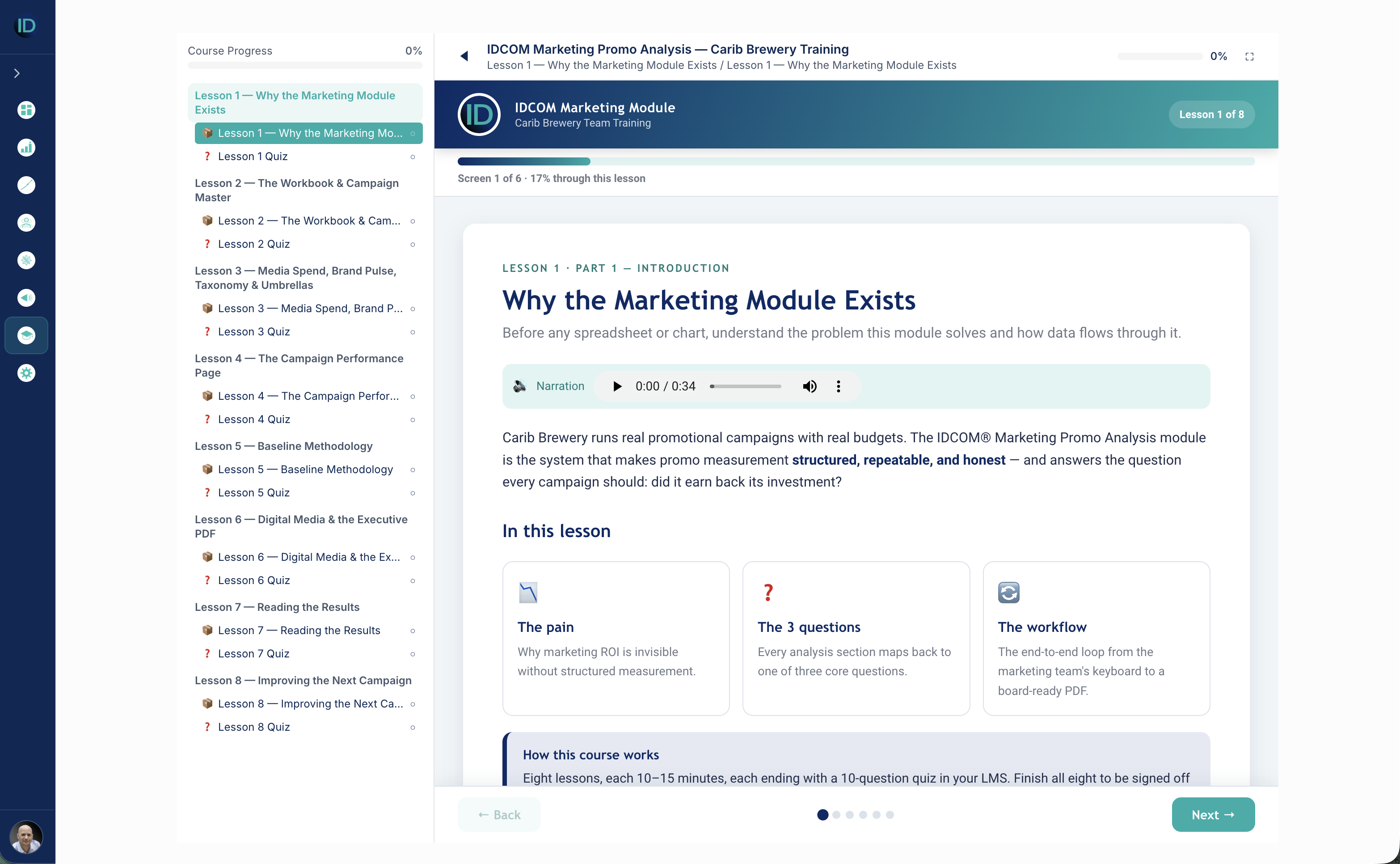
Learner-facing content player with sidebar navigation, topic-by-topic progress tracking, and previous/next navigation. Focus mode (fullscreen) for distraction-free learning. SCORM topics render full-bleed with their own in-content navigation.
Enrollment Management
Enroll individual learners or bulk-assign entire teams. Track enrollment status — active, completed, suspended — with progress percentages and last-accessed timestamps. Filter by course, status, or learner.
Progress Tracking
Per-learner, per-topic progress with time-spent tracking and completion percentages. At-risk flagging for learners falling behind. Automatic progress recalculation on topic completion with enrollment status updates at 100%.
Grading Queue
Manual grading workflow for essay and short-answer responses. Pending/graded filter, inline grade dialog with score and feedback fields. Graded submissions update quiz attempt records and trigger achievement checks.
Certificates
Automatic certificate issuance on course completion. Printable certificate view with course name, learner name, completion date, and certificate ID. Browse and search all issued certificates by course or learner.
Achievements & Badges
Criteria-based achievement engine that auto-awards badges on course completion, quiz pass, perfect score, or courses-completed count. Template management for badge names, descriptions, images, and point values.
Drip Content
Per-lesson content scheduling — unlock lessons by days after enrollment or on a fixed date. Locked lessons show a clear overlay with the unlock date. Admins configure drip schedules directly in the course builder.
Analytics Dashboards
Course completion rates, quiz score distributions, per-question difficulty analysis, and learner progress monitoring. Two dedicated dashboards — completion analytics and quiz analytics — with filterable charts.
What you'll know
The questions every L&D leader asks at the quarterly review.
The Excellence Center is built around the actual conversations training managers have — not generic course catalogs. Every dashboard is opinionated about what the next question will be.
Which courses have the highest completion rates — and which ones are learners abandoning?
How are quiz scores distributed — and which questions are too easy or too hard?
Which learners are falling behind and need a nudge before the deadline?
How long does it take the average learner to complete each course?
Are our new-hire onboarding courses actually driving knowledge retention?
Which team or department has the best training completion record?
How many certificates have been issued this quarter — and for which courses?
Which quiz questions need rewriting because everyone gets them wrong — or right?
Platform capabilities
Everything you need. Nothing you don't.
The Excellence Center ships with a complete course lifecycle — build, assign, learn, grade, certify — with no external LMS needed.
Category
Details
Content types
Text (rich HTML), Video (YouTube / Vimeo / direct), Document (PDF), Quiz, Assignment, SCORM 1.2 / 2004 packages
SCORM support
Full SCORM 1.2 and 2004 runtime API, manifest parsing, auto-resume (cmi.location), tenant logo injection, same-origin content proxy
Quiz question types
Multiple choice, Multi-select, True/false, Fill-in-the-blank, Matching, Ordering, Short answer, Essay
Grading
Auto-grade for objective types, manual grading queue for essays and short answers
Progress tracking
Per-topic completion, time spent, score tracking, enrollment progress percentage
Drip content
Days after enrollment, fixed date scheduling per lesson